/ Knowledge base /
How to invite friends to theMarketer with Tell a FriendHow to invite friends to theMarketer with Tell a Friend
Good results are worth sharing, especially when sharing comes with a reward. If you know someone who could benefit from theMarketer, you can help them discover the platform while reducing the cost of your own subscription.
With Tell a Friend, inviting new users is simple. When someone you invite pays for their subscription, you receive a discount equal to their first month’s subscription amount, covering up to 100% of your own subscription invoice.
Here’s how to send your invitations and keep track of your referrals:
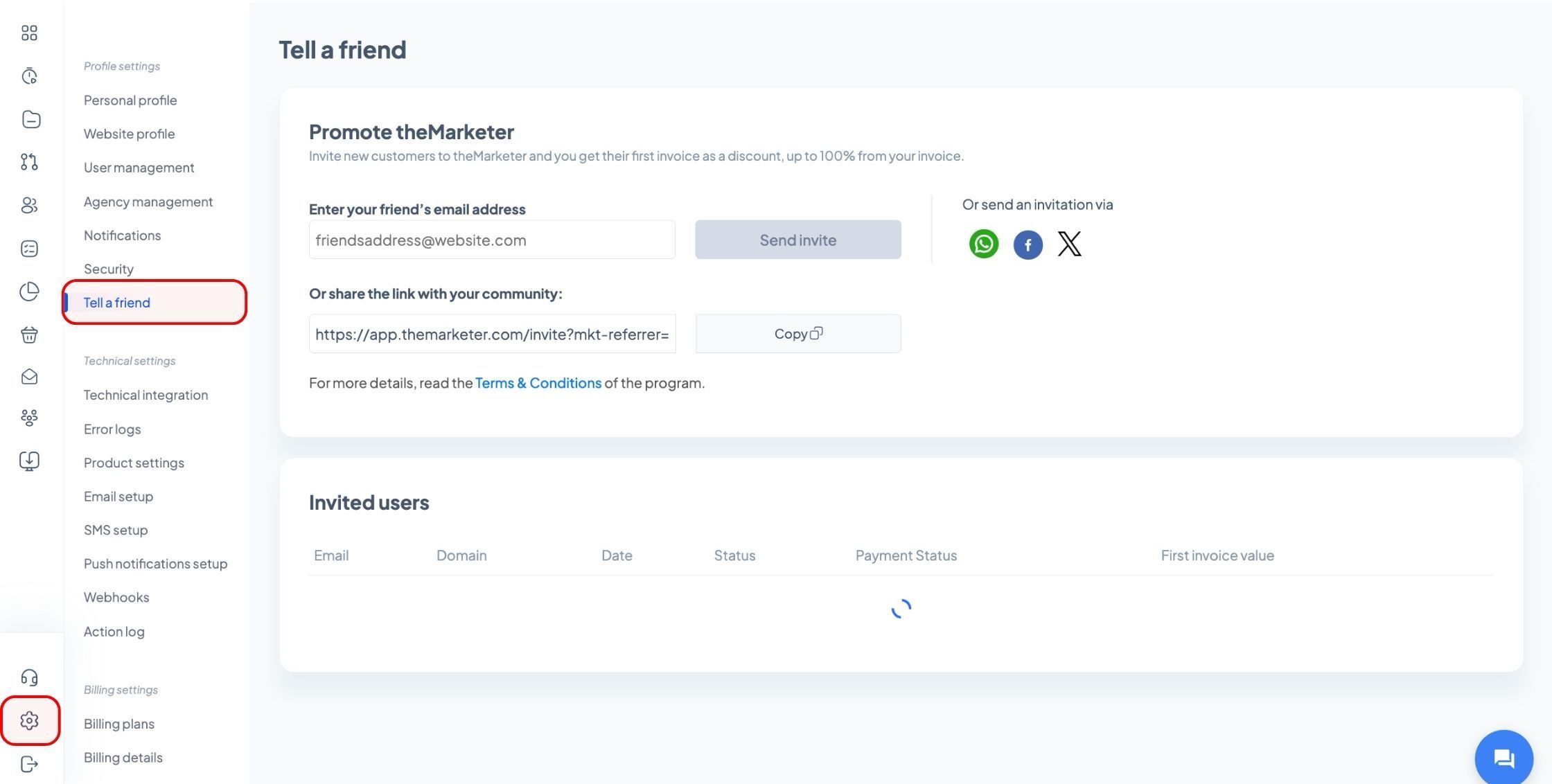
1. Go to ‘Settings’ > ‘Tell a friend’.
Log in to your theMarketer account and open the ‘Tell a friend’ page from ‘Settings’.
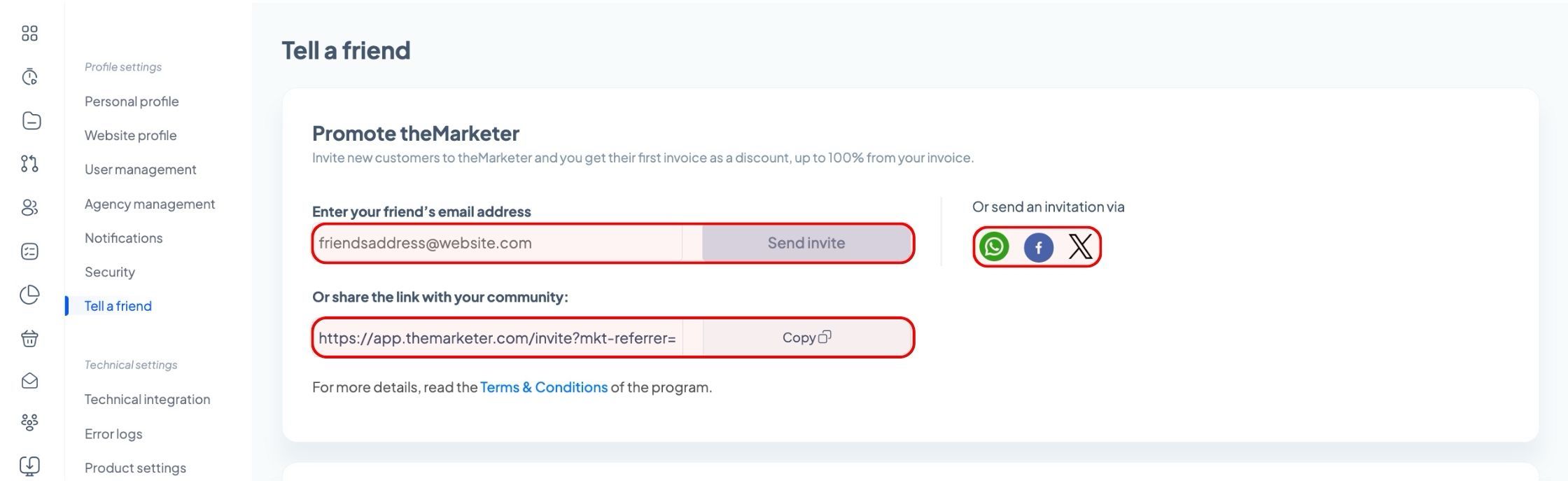
In the ‘Promote theMarketer’ section, you can send an invitation by email or copy your unique referral link to share it yourself.
2. Invite your friends by email or share your referral link.
To send an invitation directly from theMarketer, enter your friend’s email address in the ‘Enter your friend’s email address’ field, then click ‘Send invite’.
To invite someone else, repeat the same steps with their email address. There is no limit on the number of invitations you can send.
If you prefer to share the invitation yourself, click ‘Copy’ next to your unique referral link under ‘Or share the link with your community’. You can then paste it into a message, an email, or a social media post.
You can also use the WhatsApp, Facebook, or X icons under ‘Or send an invitation via’ to share your invitation through those channels.
Keep in mind that the person you invite needs to click your referral link and register through it for their account to be associated with your referral.
3. Follow your friends’ progress.
In the ‘Invited users’ section, you can review your referrals, including their email address, domain, date, status, payment status, and first invoice value.
Each referral progresses through the following stages:
- Invitation Clicked – Your friend has clicked the referral link but has not registered yet.
- Accepted – Your friend has registered on theMarketer.
- Completed – Your friend has added a domain to their account and can access the platform.
- Paid – Your friend has successfully paid for a subscription.
The discount becomes available once your friend pays for their subscription. Clicking the link or creating an account alone does not unlock the reward.
4. Receive your subscription discount.
Once your friend pays, your discount is earned and applied to your first invoice after their payment. The discount equals the amount they paid for their first month’s subscription, excluding additional services or purchases such as SMS credit, transactional email credit, or an alphanumeric sender ID.
If several friends subscribe in the same month, their referral discounts are added together. The total can cover up to the full subscription amount on your next invoice.
For example, if your next subscription invoice is €200 and two friends pay €150 and €100 for their first month respectively, you will receive a €200 discount. The remaining €50 will be lost and cannot be carried over to another invoice.
You can also participate while using a free theMarketer plan. If a friend you invite pays €100 for their first month and you switch to a paid plan in the same month, the €100 discount can be applied to your first invoice, up to its total amount.
Keep in mind
To receive a discount, you must have an active theMarketer account.
The person you invite must keep their account active for at least three months. If they close or cancel their account before that period ends, theMarketer will charge you back for the referral discount you received.
Tell a Friend discounts can be combined with other promotions or discounts unless otherwise stated.
You can review the full program rules by clicking ‘Terms & Conditions’ on the ‘Tell a friend’ page.
And... you’re done!
You’re now ready to introduce your friends to theMarketer, follow their progress, and turn your recommendations into savings on your subscription.
If you need further guidance, our team is always happy to assist you. Contact us at iam@themarketer.com with any questions about Tell a Friend.
Related articles
STILL HAVE QUESTIONS?